Friday, 3 April 2020

Microsoft Teams 101

One of the things I've been asked about most this week has been how to use Teams for meetings. Teams is basically Microsoft's replacement for Skype which is being retired at some point this year. Teams is much more than an instant messaging app though. It can host meetings and link through with Office, SharePoint and OneDrive. Chances are if your organisation uses Office 365, you will also have Teams. I don't claim to be an expert on Microsoft or Teams but here is a quick guide to using it for virtual meetings (for the purposes of this I'm assuming that you're on a Windows environment, other operating systems are available).


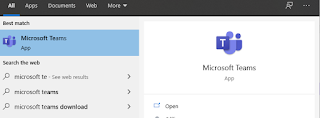
Start Teams by clicking on the Start button and typing Microsoft Teams. The application looks like this:


When you open it for the first time, Teams will look something like this:


If you are invited to a Teams session you will be sent a link to follow or dial in details to call into. Teams invitations typically look like the following:


To join a meeting, click on the link and follow the on-screen instructions. The welcome screen will look something like this:


Once you have joined the meeting, you will have the following options on the bottom of your screen:


The buttons work as follows:

  • The camera button allows you to enable and disable your webcam
  • The mic button allows you to mute and unmute your mic
  • The screen button allows you to share your screen
  • The dot button allows you to change your mic and phone settings
  • The chat icon allows you to instant message the meeting participants
  • The people icon allows you to see who else is on the call
  • The leave button allows you to exit the meeting

To start a meeting in Teams click on the Calendar tab:


You can select the Meet Now option or Create Meeting button as below and give your meeting a title, add your attendees and set the date and time. Click Save and the meeting invitation will be sent to your colleagues.


And that's it! You are now an official Teams user! A couple of quick points:

(1) Before joining a meeting make sure the room you're working from is free of all children and pets where possible. There is nothing like a rogue child to really challenge you when you're trying to juggle 100 different things at once.
(2) Mute your mic and stop your camera if you're not actively using them. This will save bandwidth and improve the call quality.
(3) The blur background button in settings is nothing short of genius. Light sabres and disney princess stuff everywhere? Teams has your back. Click More Settings ... Blur Background and everything will become nice and blurry so your colleagues are focusing on you and not the absolute chaos your beloved children have made of your house (or whatever it is you'd rather not have in sharp focus).

That's all folks.


Wednesday, 25 March 2020

Service Desk 101: How to hold it together in a crisis (Part 2)

Thanks for staying with me - let’s do this!

Move on to the remaining big hitters - OK so we’ve dealt with the vulnerable and the absolute essential stuff now is the time to start using that priority matrix again. If an incident is a priority one or two typically that means the potential for a major incident so try and fix them as soon as possible. Check on automated alerts too. That server that’s getting a bit twitchy? Try and get a maintenance reboot in out of hours so at least you’re not adding to your woes.

Look at what’s left - the chances are your incident queue is absolutely ridiculous at the moment (I know ours certainly is). Reduce the pressure on the Service Desk by posting self help content on your IT portal or intranet. The more we can empower our colleagues the more time we have to fix everything else. This is one of my favourite things I’ve seen in the last few days - simple but really effective:

https://twitter.com/srpnor/status/1242426104096460801/photo/1

H/T: Steve Patterson @srpnor

Get creative - I haven’t been a techie since 2003 but guess what - if you ask me to sort your VPN issue I work for the IT department and I’m all in. Luckily my AD and OS skills still work (just) and I’m loving that command line prompts are still very much a thing in 2020. So far today I’ve used Teamviewer, Quick Assist and Zo Ho Assist when I was in a pinch and the previous 2 weren't cooperating - you can check it out here if you’re interested: https://www.zoho.com/assist/  So channel your inner Tony Stark and channel your inner geek.

Training - try and make sure everyone in the team has the same basic level of understanding, particularly if you’ve had to do things differently. I’ve taken to posting quick notes in a shared IT Notebook on our team OneDrive. It’s not fancy, but it’s quick, accurate and everyone can access it.

Try & keep a sense of normalcy - I’ve set up daily check ins with my team and have moved our weekly service health check online. I think it’s very easy for people to feel scared and isolated at the moment so try and keep things as normal as possible. I’ve also taken to sending my team little care packages - nothing fancy - one colleague loves her diet coke so I’ve sent her some - another loves biscuits. Basically Amazon Prime is your friend. I’ve done this at the same time as equipment orders to keep the load down on deliveries though.

Other resources - here are some useful links to more content:

https://itsm.tools/ for free ITSM blogs, articles and best practice guidance 

https://coronavirustechhandbook.com/home
- a crowd sourced tech handbook for helping people provide IT services during the Coronavirus pandemic:

https://itsm.zone
- offering discounted training to anyone affected by the pandemic - more info here: https://www.linkedin.com/pulse/itsm-zone-calling-can-we-help-claire-agutter/

https://pinkelephant.co.uk/online-itsm-training/
- lots of training and best practice info

https://www.facebook.com/groups/back2itsm/
- Facebook group for ITSM chat and industry gossip.

https://www.facebook.com/groups/thisisanitsupportgroup/
- Facebook group for all things tech related.

https://www.nhs.uk/conditions/coronavirus-covid-19/
- UK health advice

https://www2.hse.ie/coronavirus/
- Irish health advice

https://www.youtube.com/watch?v=XO6FW1aJkTw&feature=youtu.be
- because it’s brilliant; Simon Pegg and Nick Frost need to make a sequel to Shaun Of The Dead immediately.


I know it’s scary and it sounds a bit counter intuitive given that we’re all socially distancing but this only gets fixed when we all act together. Be safe, stay indoors and look out for each other and remember you’re not alone. For every polished professional who’s rocking it on every front going there’s the person who had to talk a colleague through VPN whilst her middle child loudly announced that he’s just had a really good wee. OK fine - I’m the person with the rogue child but moving on - if you want to talk ping me, I’m @vawns on Twitter, you can find me on Facebook and my personal email is vawns.murphy@gmail.com. We’ve got this.


Service Desk 101: How to hold it together in a crisis (Part 1)

So here’s the thing -  we’re in the midst of global pandemic. Coronavirus, COVID-19 whatever you call it, I think we can all agree that things are a bit tough at the moment. At the time of writing this, most countries are on lockdown. I'm Irish and things at home have been shut down for weeks. Shops aren’t open (apart from the essentials) people are mostly confined to their homes and children are being home-schooled. I live in the UK and it’s Day 3 of the serious stuff, I’m working from home whilst trying to maintain a sense of normality for my kids and my co-workers. I’ve already had to resort to bribery for the kids (chocolate muffins) and I’ve appeared on many, many Skype calls looking a bit dishevelled. But we are where we are so let’s have a look at some tips to keep your Service Desk and IT Department going until things start getting better.

Look after your people - you can have the strongest processes and the fanciest tech but at the end of the day it’s your people that are your everything. Keep  them safe, make sure they’ve got the equipment they need and remind them to take regular breaks.

Start with the most in need - we all know about ITIL and ITSM best practice where we talk about prioritising Service Desk calls on impact and urgency. In normal times that's absolutely the right thing to do but.at the moment I don’t think we’re dealing with any approximation of normal so look at what’s best for your organisation. I work for a small housing association in England and I’ve told my team to prioritize anyone dealing with front line services so people looking after the elderly, the vulnerable or staff managing our independent living schemes. We can sort everything else out in time but these are the people we need to look after, first and foremost.

Next deal with connectivity - make sure that people can work from home. This might look different to how it normally does so be flexible. I’ve had colleagues who’ve left their laptops in the office and getting hold of equipment is a bit challenging at the moment so look at what you can work with. If you have a colleague that has their own laptop or tablet there’s Office 365  other office suites available). Also get people to install Skype, GoTo Meeting etc on their phones so that it’s easy for them to stay in touch.

Check equipment levels - there’ll always be someone who’s lost a cable or has forgotten to bring home their laptop charger or who needs a replacement mouse. Talk them through using alternatives for example a home device if they’ve not got their laptop or ordering equipment directly to their door.

Give good comms - keep people updated. I’ve written to all our key stakeholders to let them know who we’re prioritising and why. Let people know that you will get to them - nothing is going to be lost, ignored or forgotten about, it’s just a really, really tough time at the moment and we’re doing everything we can.

I’ll be back soon with more ideas. What do you think so far? What are you doing to keep the show on the road at your work? How are you all coping? Please tweet me @vawns or let me know in the comments. 

Thursday, 16 May 2019

Major Incidents vs Mornings With Young Children

So here's the thing. No one likes major incidents; by their very definition they are the serious stuff.  But there is something that’s tougher than dealing with even the trickiest major incident. Want to know what it is? Getting my children ready in the morning. Don’t believe me? Here’s a look at how I handle major incidents versus mornings with my children who will hereafter be known as Holy Terrors 1, 2 and 3.

Major Incidents

When dealing with a major incident here’s what generally happens:

I get a heads up from the service desk or support team tech. I take a few minutes to sanity check what’s gone wrong, the impact and who needs to deal with it. I make sure a major incident has been raised and then ping out a quick comms to the key stakeholders and VIPs.

Next step is to sort out a conference bridge and get everyone online. I ask for a quick status update and if we know what’s gone wrong, if we know how to fix it or have workarounds and if we have an estimated fix time. I ask the teams involved if they need any additional resources or third party support.

Draft another comms, this time to the business (which has been templated to kingdom come) and ask someone to quickly sanity check it before issuing it via the service desk mailbox. I check to make sure the service desk IVR message and intranet have been updated so that the IT department doesn’t get overloaded with calls.

Return to the major incident call and check in. At this point one of the following things is happening:

     We know what’s happened and we have a fix. I work with the team to ensure that the right testing is carried out and get an emergency change raised.
     We have no idea what’s gone wrong and are feeling a bit panicky. I calm things down by reminding everyone that it will be ok and we will figure it out. At this point I’ll look at who else needs to be involved and also check in with the business to give them an update. I’ll also make sure that everyone is appropriately caffeinated.
     Someone is unsettled and / or venting. I thank them for their feedback and steer the call back to the fix effort. In a previous life I have been known to accidentally hit the mute button on anyone ranting at my people.

I continue to send out updates while the issue is being worked on and stay with the team during the fix effort.

Once we think the issue has been resolved, I let the service desk know and call a handful of users affected to make sure all is well, then I send out a final comms stating that normal service has been restored. I then make some notes on what happened, what the cause was and how we fixed it before scheduling a quick catch up to look at any actions that could prevent a future occurrence.

Morning Routine

Getting three children ready and out the morning? Different ball game. Here’s how it should look:

06:15 get up, sort self, get kids breakfast, straighten hair and leave at 7:15 so I can drop kids with our awesome and long suffering childminder for 7:30 so I can get to work for 8:15 ish so that (a) I get a parking space and (b) I can leave at 17:00 ish to get back to said awesome childminder on time as she finishes at 17:30.

The reality? It goes something like this:

06:15 Alarm goes off. Check work emails then hop in the shower and get dressed. Try and ignore HT3 banging on the door saying they need to come in because they’re lonely and they need me.

06:25 Pick up HT3 & wake up HT2 and HT1 using best Mary Poppins voice. HT2 refuses to get out of bed initially, so I coax them out by bribing them with the promise of chocolate / tablet time / games time later. HT2 will stomp down the stairs and go back to sleep on the sofa. HT1 will start to faff saying that they’re tired and hate mornings. I tell them that I love them but they need to move.

06:35 All 3 kids sat at the breakfast table. All three will moan about the choice of cereal despite it being what they chose when we went to ASDA at the weekend. HT2 will then want crumpets. HT3 will demolish cereal, fruit, toast and a yoghurt and will still claim to be hungry. HT1 will pick at her cereal like it’s something out of a bush tucker trial from the jungle / I’m a sleb. All three will complain that their orange juice either doesn’t have enough bits in it or has too many or that they want apple juice instead.  

06:50 I tell all 3 kids that they need to get dressed into the nice clean clothes that I got out the night before all ready for them. HT3 will get dressed but will claim they can’t find any socks. HT2 will sit in their batman pants til we’re due to leave the house. HT1 will help the younger two for which I am eternally grateful but there will also be a lot of makeup and phone related faffing. They will also update me on what’s going on in the world. Currently, it’s all about the James Charles and Tati Westbrook falling out on YouTube. I try and make supportive noises. There will be at least one further sock-related emergency despite the fact all three of them have multiple packets of socks in the same colour.

06:55 I start trying to straighten my hair and put on makeup so I don’t frighten the horses. I try not to think about the unfolding chaos that is undoubtedly unfolding in my absence.

06:56 Blood curdling screams from the direction of the kids’ bedrooms so I abandon hair straightening and make up. Separate kids and try and figure out who was attempting to kill who. Calm things down only for the same thing to happen two minutes later when I leave the room to grab my laptop.

07:00 Remind all 3 kids that they need to clean their teeth and brush their hair. HT3 will refuse point blank so I will have to do it for them. HT2 will moan about the taste of toothpaste. HT1 will claim that they can’t find their hair brush / bobbins / clips despite being laid out for them the night before. They will allege that someone had crept into their room like a ninja and stolen them. At this point I’m wishing I could give up pretending to be an adult and go back to bed.

07:05 Give kids 10 minute warning and ask them to put their shoes on. Take out lunch boxes from the fridge and hand them out. HT2 will then decide they hate everything in them and want school dinners instead. World War 3 ensues when I tell them to suck it up. I drop the Mary Poppins act and start using my Batman voice.  

07:10 Give kids 5 minute warning and tell them to put their shoes and coats on. Try and locate my shoes that should be in the shoe basket but usually end up in HT3’s toy box. Locate shoes, my work pass and about eleventy billion bits of tat.

07:15 Tell kids to get in the car. None of them are ready, HT1 is faffing with their hair, HT2 is still in their pants and HT3 is refusing to put on their school shoes saying they’re uncomfortable. Reiterate the importance of Mummy getting to work so she has money for useful things like food, clothes, toys and paying the mortgage.

07:20 Tell kids to hurry up. Threaten to drop them off directly to school in current state i.e. shoeless / batman pants / not enough makeup.  

07:25 Start losing will to live. Attempt to get kids into car and at this point HT2 will make a break for freedom, whilst shouting “you’ll never take me alive!” They also may or may not be shoeless. Sprint down the road after them wondering if it counts as my daily cardio.

07:30 Finally get all 3 kids in the car. Drive to lovely childminder whilst answering eleventy billion questions from HT2 about Star wars and football. I rock the Star Wars content but my football knowledge only extends to Ireland in Italia 90 and Manchester United in the 90s. HT1 will be texting furiously and HT3 will be singing along to the radio. She’s going through a Justin Bieber phase at the moment so FML.

07:40 Drop kids with childminder wishing her good luck. All 3 kids complaining about “ mummy being stressy.”

07:45 Get back in car. Try to find inner calm.

07:55 Start driving to work. Attempt to find inner calm / enter zen like state a complete failure.

08:10 Stress levels at DEFCON 1 level so decide to give mindfulness app a go.

08:20 Give up on mindfulness. Decide coffee is the only way forward. Wonder if Starbucks do a size bigger than venti. Make mental note to tweet them about it later.

08:30 Make it to work car park, taking the last available space and sprint into the office so I can leave at a reasonable time and do the whole thing again at the end of the day only in reverse. Sprint back outside to make sure I’ve not parked badly. Head to desk to deal with email mountain. Realise I’ve left my laptop in the car so slink back outside to retrieve it.

09:00 Catch sight of self in works loo. Still not wearing any make up and have mad hair that’s only straightened on one side.

Final Thoughts

I wish there was a magic wand I could wave to make everything run more smoothly.  I adore my family and I love working in ITSM so the craziness is definitely worth is. I guess the thing is - if you’re struggling - know that you’re not alone. For every perfect professional or alpha parent, there’s the person who had to talk someone down from ranting at senior management or the mum that left the house missing a shoe / laptop / makeup bag and yes - I’ve done all three. The thing is - just keep going - it will get better and if it doesn’t? Call me and we’ll go for coffee / vodka / cake and we’ll commiserate together.

What do you think? What’s harder - major incidents or getting your kids ready in the morning? Let me know in the comments or reach out to me on twitter - I’m @vawns

Monday, 23 July 2012

Software Asset Mgt – ISO Standard News

Hi All, Just to let you know the new version of ISO 19770 – 1 is live and available here: http://www.iso.org/iso/catalogue_detail.htm?csnumber=56000 Think it’s worth pointing out as the previous version was available for several years and yet not one organisation globally managed to get accredited against it. Hopefully this will change with the new phased approach. One of my itSMF colleagues has written a useful article on the rest of the standard which you can find here: http://www.itassetmanagement.net/2012/06/18/report-wg21-korea-meeting/

Monday, 21 May 2012

itSMF UK Transition Mgt Working Party - Future Collateral

Hi All, I’ve just chaired an itSMF UK Transition Mgt Working Party meeting and one of the agenda items was ideas for future collateral. Some of the ideas we have so far are: • Booklet / “little ITIL” on how Software Asset Management interfaces to ITIL 3 2011 and the ISO19770. • Knowledge Management. • Testing & Validation & the V Model. How do they work in real life and how to scale them appropriately. • Transition planning – how to manage handovers to production in real life and the role of the Service Design Package (SDP) If there is anything you would like to see covered next year – get in touch!

Friday, 18 May 2012

itSMF UK Transition Mgt SIG meeting 21st June @ Rolls Royce Derby

The next Transition Management Special Interest Group meeting will be at Rollys Royce in Derby on the 21st of June. Speaking from the Transition Mgt Working Party, Richard Horton will be presenting on how to improve your existing Change Management process. There will also be a networking event and plenty of opportunities to catch up with likeminded professionals to swap war stories and ideas! If you have an interest in Service Transition and Software Asset Mgt, this is the event for you!

Sunday, 19 February 2012

itSMF UK 2012 Conference

Thinking of ideas for this year’s itSMF UK conference. One presentation I’m submitting is “Problem & Availability Management – stronger together”. It will be similar to the “Incident, Problem & Availability Management – the new holy trinity” presentation I wrote for an earlier itSMF UK seminar but with moving the focus to just Availability & Problem Mgt – I can focus more on being proactive. This is important to me as until proactive PM got “reinstated” in ITIL V3 2011 – no one was talking about it anymore so there’s a generation of Problem Managers out there who need to catch up. The presentation will talk about how running both AM & PM together gives you the best of both world, improving Service Quality at both the component and the service level which guidance on how to do this in real life, templates to help get started and reference metrics. Fingers crossed it gets accepted!

Monday, 31 October 2011

Implementing Software Asset Management

Writing a whitepaper for the itSMF UK and FAST on the common pitfalls on implementing SAM and avoiding them. So far the things I have to worry about are: • Getting senior management buy in • Running SAM behind the scenes so it’s not perceived as “getting in the way” by both your techies and the rest of the business • Multiple sources of information • Unlocked PCs where everyone is a local admin • Managing multiple stakeholders • Managing conflicting interests If you are looking to implement SAM – are these the kind of things you’re worrying about?

Friday, 30 September 2011

Incident Problem & Availability Management – The New Holy Trinity

Have been asked to speak on Problem Management at an itSMF event next year. My topic? Incident Problem & Availability Management – The New Holy Trinity. This is my presentation outline: We all know that Incident and Problem Management, if working well, can reduce interruptions to the end user and improve service quality for the business. From an end user’s perspective though, availability is the name of the game. While most organisations have the basics covered with Incident Management, how many use Problem & Availability Management to look at the underlying cause of Incidents at a service as well as a component level? This presentation will be a practical guide on how to use Incident and Availability Management to support your Problem Management Process and improve both quality of service and the business perception of IT.

Tuesday, 27 September 2011

itSMF UK Transition Management SIG - Plan for 2012

Hi All, The Transition Mgt SIG is planning for the next 12 months. If you have any Service Transition or Software Asset Management questions or would like to get involved then check out our discussion group on Linked In:

Thursday, 8 September 2011

Pink Elephant Education & Consulting group on Linkedin

Check out the Pink Elephant Education & Consulting group on Linkedin http://www.linkedin.com/groups?home=&gid=2952124&trk=anet_ug_hm The group is for individuals and companies in the UK and abroad looking at how IT Service Management best practices can be fully utilised within their organisation and I am the new group moderator :-) Pink Elephant for over 30 years has been at the forefront of ITIL and ISO20000 education and business process solutions.

Wednesday, 7 September 2011

Example Release Note

As promised, here is my take on the Release note (and yes, of course it’s pink!!) It includes the title of the release, the audience, any related Changes, Problems or Known Errors and if any action should be taken. What do you think? Do you use something similar in your companies?

Tuesday, 6 September 2011

Why Release notes are a good idea

One of the questions I ask when evaluating any Release Management process is how the organisation communicates a Release to the Service Desk and end users. I ask because quite frequently, it’s not done in a consistent way leading to an IT infrastructure perception that the Release has been “chucked over the fence” for them to support and a user perception that they know more than IT if they call up the Service Desk about a Release only to find that the Service Desk analyst knows nothing about it.

Using a Release note is a good idea for the following reasons:

(1) It is a consistent, auditable way of communicating that a Release is forthcoming to the user population and importantly to the rest of IT who will end up supporting it.
(2) It should communicate the main content of the release so that users know what to expect.
(3) It should highlight any differences in support for example floorwalkers will be onsite to provide help and guidance.
(4) Having the Release note issued via the Service Desk underlines the concept that the Service Desk is the single point of contact for IT support.

I will talk about what a Release note could look like in my next post.

What do you think about Release notes? Do you use them in your organisations?

Monday, 5 September 2011

itSMF UK Conference Monday 7th November 2011

I will be presenting at this year’s itSMF UK conference with my lovely work colleague, Peter Hubbard. Our presentation is called Change vs. Release Management and this is our session brief:

Change & Release Management working together effectively can significantly increase Service Quality by delivering:
• An increased volume of change
• Reduced defects
• Less downtime for maintenance by packaging things into releases

All too often, there is confusion in many organisations about where Change Management ends and where Release Management begins. “What’s the difference between Change and Release Management” is one of the most frequently asked questions on Service Management websites. The aim of this presentation is to explain once and for all the difference between Change & Release Management and how to run the two processes together effectively. Practical guidance will be given on running the two processes together along with tools and templates.

The full details are here:

http://conference.itsmf.co.uk/abstracts.html?event=1#a1E1

Monday, 18 April 2011

Service Desk & IT Support Show - Wednesday 20th April 2011

I will be part of the discussion panel answering questions following this session at the Service Desk & IT Support Show on Wednesday:

http://www.servicedeskshow.com/

Fast and Flexible: Why speed matters in automating IT processes

How many times do we hear that something can’t be done because the process won’t allow it? Today processes need to evolve at the speed of business, and our process automation needs to be a core business asset: but it cannot be if it is harder to change the automation than to work around it!
Kevin Parker will explain how modern automation tools and techniques can not only streamline existing processes but also transform them by integrating third party systems directly into the automation.


I’m also looking forward to catching up and hearing about the latest ideas, technology and challenges in the world of ITIL and Service Management.

itSMF UK Service Transition Survey

Take the itSMF UK Service Transition Survey located on the main itSMF website:

www.itsmf.co.uk

It’s quick, 6 questions, and is your way of registering your needs and challenges for the coming year.

Monday, 21 March 2011

itSMF UK Transition Management Working Party - Event on 26th May 2011 hosted by Hornbill

Hi All,

There will be an itSMF UK Transition Management SIG event on the 26th of May at the Hornbill offices in Ruslip.

The following are topics for break out sessions suggested by working party members:

· Templates, metrics, checklists and dashboards
· Toolsets & their usage
· Current challenges in the Transition Mgt arena
· Running CAB via social networking tools
· The CMS and how to manage the metadata
· The difference between a Release & a Change
· Cloud computing and how to manage your data
· Checklist of things to do before moving to Cloud computing
· RFID chips and their impact on Software Asset Mgt
· Destroying the myth – “the toolset will fix it” or “using auto-discovery software “covers off your SAM process without needing any intervention
· How to police users using their own equipment
· How to be more agile
· The impact of “Apps” on Transition Management activities
· Using COBIT & ITIL in Transition Management activities
· How can release and project management work together?
· Agile project vs ITIL. Can they co-exist?


The plan is to post them on the itSMF UK website and our discussion group on LinkedIN and ask our members to vote on what they want to discuss. The 3 most popular topics will be selected for the break out sessions.

So have a look, vote and let me know what you think!

http://www.linkedin.com/groupItem?view=&gid=3806568&type=member&item=47720689

www.itSMF.co.uk


Wednesday, 16 March 2011

CAB Agendas – what’s on yours?

After reading this article yesterday on ITSM watch:

http://www.itsmwatch.com/itil/article.php/3923731/What-Does-a-CAB-Do-All-Day.htm

it struck me how important it is to have a structured CAB agenda and Terms of Reference:

I would have the following items on my CAB agenda:


• Review of forthcoming changes
• Review of implemented changes
• Review of failed / backed out changes
• Review of out of process changes
• Review of lessons learned
o Changes that went well
o Change activity that could be improved on
• Definitions of new Standard Changes
• Updates to Change Management templates
• The Change Management process
• Change management success stories


Although not all items would be covered at every meeting for example, the review of failed / backed out changes could be done in conjunction with Problem Management, new Standard Changes would only be discussed when required, lessons learned referred back to on a monthly basis and the general process and success stories on a quarterly / 6 monthly basis.

What do you think? Is there anything that I’ve missed? What do you do in your organizations?

Monday, 14 March 2011

Transition Management SIG event 26th of May at Ruislip - Discussion topics needed

Hi All,

The next Transition Management a SIG event has been confirmed for the 26th of May at the Hornbill offices in Ruislip. The format of the event will be a 30 minute update from the SIG then breakout sessions.

These are the suggested topics so far

· Templates, metrics, checklists and dashboards
· Toolsets & their usage
· Current challenges in the Transition Mgt arena
· Running CAB via social networking tools
· The CMS and how to manage the metadata
· The difference between a Release & a Change
· Cloud computing and how to manage your data
· Checklist of things to do before moving to Cloud computing
· RFID chips and their impact on Software Asset Mgt
· Destroying the myth – “the toolset will fix it” or “using auto-discovery software “covers off your SAM process without needing any intervention
· How to police users using their own equipment
· How to be more agile
· The impact of “Apps” on Transition Management activities
· Using COBIT & ITIL in Transition Management activities
If there’s anything else you would like to see covered, let me know by close of play on the 18th of March. We will then put the topics to the vote on the itSMF UK website and LinkedIN forum and the top 3 will be used on the day!

Microsoft Teams 101

One of the things I've been asked about most this week has been how to use Teams for meetings. Teams is basically Microsoft's replac...